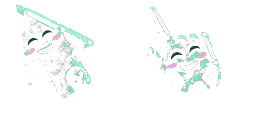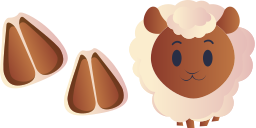
Превью курсора: Sheep - 1 - cute-cursor.com

Набор курсоров

Sheep

Cute PetsУстановлено 566 раз

Funny sheep from the farm is a well-known animal that lives near humans. We are glad to present this cute custom cursor with a sheep animal from the adorable custom cursors collection for the mouse and pointer with animals.

В расширение

Файлы курсора

Скачайте файл или скопируйте готовый CSS и код для Roblox с правильным hotspot.

Курсор - 1 - cute-cursor.com

Курсор

Скачайте файл или скопируйте код для сайта или Roblox.

Скачать курсор для Roblox

Вставьте этот CSS в стили. Координаты hotspot уже указаны.

.custom-cursor {

  cursor: url('https://cute-cursor.com/cdn/packs/209/arrow.svg') 19 12, auto;
}

Загрузите изображение в Roblox, замените YOUR_ASSET_ID и вставьте LocalScript.

-- Roblox custom cursor
-- Image URL: https://cute-cursor.com/cdn/packs/209/arrow.svg
-- Hotspot: 19, 12
-- Size: 128x128
-- 1. Upload the image to Roblox and copy rbxassetid
-- 2. Replace YOUR_ASSET_ID below
-- 3. Put this LocalScript in StarterPlayer > StarterPlayerScripts

local UserInputService = game:GetService("UserInputService")
local RunService = game:GetService("RunService")
local Players = game:GetService("Players")

local player = Players.LocalPlayer
local playerGui = player:WaitForChild("PlayerGui")

local HOTSPOT_X = 19
local HOTSPOT_Y = 12
local CURSOR_WIDTH = 128
local CURSOR_HEIGHT = 128

local screenGui = Instance.new("ScreenGui")
screenGui.Name = "CustomCursorGui"
screenGui.ResetOnSpawn = false
screenGui.IgnoreGuiInset = true
screenGui.DisplayOrder = 999999
screenGui.Parent = playerGui

local cursor = Instance.new("ImageLabel")
cursor.Name = "CustomCursor"
cursor.BackgroundTransparency = 1
cursor.Size = UDim2.fromOffset(CURSOR_WIDTH, CURSOR_HEIGHT)
cursor.Image = "rbxassetid://YOUR_ASSET_ID"
cursor.ZIndex = 999999
cursor.Parent = screenGui

UserInputService.MouseIconEnabled = false

RunService.RenderStepped:Connect(function()
    local mouseLocation = UserInputService:GetMouseLocation()
    cursor.Position = UDim2.fromOffset(mouseLocation.X - HOTSPOT_X, mouseLocation.Y - HOTSPOT_Y)
end)
Указатель - 2 - cute-cursor.com

Указатель

Скачайте файл или скопируйте код для сайта или Roblox.

Скачать указатель для Roblox

Вставьте этот CSS в стили. Координаты hotspot уже указаны.

.custom-pointer {
  cursor: url('https://cute-cursor.com/cdn/packs/209/hand.svg') 54 0, pointer;
}

Загрузите изображение в Roblox, замените YOUR_ASSET_ID и вставьте LocalScript.

-- Roblox custom cursor
-- Image URL: https://cute-cursor.com/cdn/packs/209/hand.svg
-- Hotspot: 54, 0
-- Size: 128x128
-- 1. Upload the image to Roblox and copy rbxassetid
-- 2. Replace YOUR_ASSET_ID below
-- 3. Put this LocalScript in StarterPlayer > StarterPlayerScripts

local UserInputService = game:GetService("UserInputService")
local RunService = game:GetService("RunService")
local Players = game:GetService("Players")

local player = Players.LocalPlayer
local playerGui = player:WaitForChild("PlayerGui")

local HOTSPOT_X = 54
local HOTSPOT_Y = 0
local CURSOR_WIDTH = 128
local CURSOR_HEIGHT = 128

local screenGui = Instance.new("ScreenGui")
screenGui.Name = "CustomCursorGui"
screenGui.ResetOnSpawn = false
screenGui.IgnoreGuiInset = true
screenGui.DisplayOrder = 999999
screenGui.Parent = playerGui

local cursor = Instance.new("ImageLabel")
cursor.Name = "CustomCursor"
cursor.BackgroundTransparency = 1
cursor.Size = UDim2.fromOffset(CURSOR_WIDTH, CURSOR_HEIGHT)
cursor.Image = "rbxassetid://YOUR_ASSET_ID"
cursor.ZIndex = 999999
cursor.Parent = screenGui

UserInputService.MouseIconEnabled = false

RunService.RenderStepped:Connect(function()
    local mouseLocation = UserInputService:GetMouseLocation()
    cursor.Position = UDim2.fromOffset(mouseLocation.X - HOTSPOT_X, mouseLocation.Y - HOTSPOT_Y)
end)
Бесплатно

Get the Cursor Changer extension

Бесплатно для Chrome. Установите расширение и нажимайте «Добавить» у любого курсора.

Установить в Chrome