Xem trước con trỏ: Goopy Le Grande - 1 - cute-cursor.com

Bộ con trỏ

Goopy Le Grande

CupheadĐã thêm 29 lần

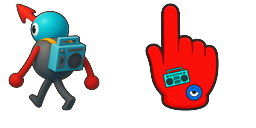
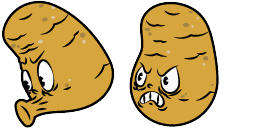
Goopy Le Grande pointer for Chrome with boss fight hover. Cuphead fan art.


Thêm vào tiện ích mở rộng

Goopy Le Grande looks like a big blue ball with eyes, and a red nose is able to change its shape, turning into a boxing glove. Goopy cursor for a mouse is a good fan art to decorate your browsing, a boxing glove hover comes together with the custom cursor with Goopy.

Tệp con trỏ

Tải tệp xuống hoặc sao chép mã CSS, JavaScript, React và Roblox sẵn sàng sử dụng với điểm nóng chính xác.

Con trỏ - 1 - cute-cursor.com

Con trỏ

Tải tệp xuống hoặc sao chép mã nhúng cho trang web, React, JavaScript hoặc Roblox của bạn.

Dán đoạn CSS này vào stylesheet của bạn. Tọa độ điểm nóng đã được bao gồm sẵn.

.custom-cursor {
  cursor: url('https://cute-cursor.com/cdn/packs/1111/arrow.png') 76 0, auto;
}

Dán đoạn JavaScript này để áp dụng con trỏ với điểm nóng chính xác.

const CURSOR_URL = 'https://cute-cursor.com/cdn/packs/1111/arrow.png';
const HOTSPOT_X = 76;
const HOTSPOT_Y = 0;
const CURSOR_FALLBACK = 'auto';

const cursorValue = `url('${CURSOR_URL}') ${HOTSPOT_X} ${HOTSPOT_Y}, ${CURSOR_FALLBACK}`;

// Apply to the whole page
document.body.style.cursor = cursorValue;

// Or apply to a specific element
// const target = document.querySelector('.my-element');
// if (target) target.style.cursor = cursorValue;

Sao chép thành phần React này và bọc nội dung của bạn bằng nó.

import React from 'react';

const CURSOR_URL = 'https://cute-cursor.com/cdn/packs/1111/arrow.png';
const HOTSPOT_X = 76;
const HOTSPOT_Y = 0;
const CURSOR_FALLBACK = 'auto';

export default function CustomCursor({ children, className = '', as: Tag = 'div', style = {}, ...props }) {
  const cursorStyle = {
    cursor: `url('${CURSOR_URL}') ${HOTSPOT_X} ${HOTSPOT_Y}, ${CURSOR_FALLBACK}`,
    ...style,
  };

  return (
    <Tag className={className} style={cursorStyle} {...props}>
      {children}
    </Tag>
  );
}

// Usage:
// <CustomCursor>Your content</CustomCursor>

Tải hình ảnh lên Roblox, thay thế YOUR_ASSET_ID, sau đó dán LocalScript này.

-- Roblox custom cursor
-- Image URL: https://cute-cursor.com/cdn/packs/1111/arrow.png
-- Hotspot: 76, 0
-- Size: 128x128
-- 1. Upload the image to Roblox and copy rbxassetid
-- 2. Replace YOUR_ASSET_ID below
-- 3. Put this LocalScript in StarterPlayer > StarterPlayerScripts

local UserInputService = game:GetService("UserInputService")
local RunService = game:GetService("RunService")
local Players = game:GetService("Players")

local player = Players.LocalPlayer
local playerGui = player:WaitForChild("PlayerGui")

local HOTSPOT_X = 76
local HOTSPOT_Y = 0
local CURSOR_WIDTH = 128
local CURSOR_HEIGHT = 128

local screenGui = Instance.new("ScreenGui")
screenGui.Name = "CustomCursorGui"
screenGui.ResetOnSpawn = false
screenGui.IgnoreGuiInset = true
screenGui.DisplayOrder = 999999
screenGui.Parent = playerGui

local cursor = Instance.new("ImageLabel")
cursor.Name = "CustomCursor"
cursor.BackgroundTransparency = 1
cursor.Size = UDim2.fromOffset(CURSOR_WIDTH, CURSOR_HEIGHT)
cursor.Image = "rbxassetid://YOUR_ASSET_ID"
cursor.ZIndex = 999999
cursor.Parent = screenGui

UserInputService.MouseIconEnabled = false

RunService.RenderStepped:Connect(function()
    local mouseLocation = UserInputService:GetMouseLocation()
    cursor.Position = UDim2.fromOffset(mouseLocation.X - HOTSPOT_X, mouseLocation.Y - HOTSPOT_Y)
end)
Con trỏ chuột - 2 - cute-cursor.com

Con trỏ chuột

Tải tệp xuống hoặc sao chép mã nhúng cho trang web, React, JavaScript hoặc Roblox của bạn.

Dán đoạn CSS này vào stylesheet của bạn. Tọa độ điểm nóng đã được bao gồm sẵn.

.custom-pointer {
  cursor: url('https://cute-cursor.com/cdn/packs/1111/hand.png') 43 0, pointer;
}

Dán đoạn JavaScript này để áp dụng con trỏ với điểm nóng chính xác.

const CURSOR_URL = 'https://cute-cursor.com/cdn/packs/1111/hand.png';
const HOTSPOT_X = 43;
const HOTSPOT_Y = 0;
const CURSOR_FALLBACK = 'pointer';

const cursorValue = `url('${CURSOR_URL}') ${HOTSPOT_X} ${HOTSPOT_Y}, ${CURSOR_FALLBACK}`;

// Apply to the whole page
document.body.style.cursor = cursorValue;

// Or apply to a specific element
// const target = document.querySelector('.my-element');
// if (target) target.style.cursor = cursorValue;

Sao chép thành phần React này và bọc nội dung của bạn bằng nó.

import React from 'react';

const CURSOR_URL = 'https://cute-cursor.com/cdn/packs/1111/hand.png';
const HOTSPOT_X = 43;
const HOTSPOT_Y = 0;
const CURSOR_FALLBACK = 'pointer';

export default function CustomPointer({ children, className = '', as: Tag = 'div', style = {}, ...props }) {
  const cursorStyle = {
    cursor: `url('${CURSOR_URL}') ${HOTSPOT_X} ${HOTSPOT_Y}, ${CURSOR_FALLBACK}`,
    ...style,
  };

  return (
    <Tag className={className} style={cursorStyle} {...props}>
      {children}
    </Tag>
  );
}

// Usage:
// <CustomPointer>Your content</CustomPointer>

Tải hình ảnh lên Roblox, thay thế YOUR_ASSET_ID, sau đó dán LocalScript này.

-- Roblox custom cursor
-- Image URL: https://cute-cursor.com/cdn/packs/1111/hand.png
-- Hotspot: 43, 0
-- Size: 128x128
-- 1. Upload the image to Roblox and copy rbxassetid
-- 2. Replace YOUR_ASSET_ID below
-- 3. Put this LocalScript in StarterPlayer > StarterPlayerScripts

local UserInputService = game:GetService("UserInputService")
local RunService = game:GetService("RunService")
local Players = game:GetService("Players")

local player = Players.LocalPlayer
local playerGui = player:WaitForChild("PlayerGui")

local HOTSPOT_X = 43
local HOTSPOT_Y = 0
local CURSOR_WIDTH = 128
local CURSOR_HEIGHT = 128

local screenGui = Instance.new("ScreenGui")
screenGui.Name = "CustomCursorGui"
screenGui.ResetOnSpawn = false
screenGui.IgnoreGuiInset = true
screenGui.DisplayOrder = 999999
screenGui.Parent = playerGui

local cursor = Instance.new("ImageLabel")
cursor.Name = "CustomCursor"
cursor.BackgroundTransparency = 1
cursor.Size = UDim2.fromOffset(CURSOR_WIDTH, CURSOR_HEIGHT)
cursor.Image = "rbxassetid://YOUR_ASSET_ID"
cursor.ZIndex = 999999
cursor.Parent = screenGui

UserInputService.MouseIconEnabled = false

RunService.RenderStepped:Connect(function()
    local mouseLocation = UserInputService:GetMouseLocation()
    cursor.Position = UDim2.fromOffset(mouseLocation.X - HOTSPOT_X, mouseLocation.Y - HOTSPOT_Y)
end)
100% Miễn phí

Nhận tiện ích mở rộng Cursor Changer

Miễn phí cho Chrome. Cài đặt một lần, sau đó nhấp Thêm trên bất kỳ con trỏ nào bạn thích.

Cài đặt vào Chrome