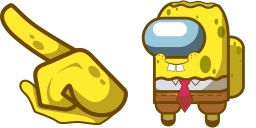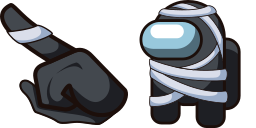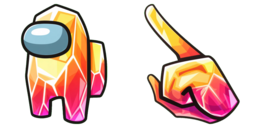
光标预览:Among Us Red Character - 1 - cute-cursor.com

光标包

Among Us Red Character

Among Us Crewmates已添加 1745 次

Red Among Us crewmate cursor for Chrome - impostor-hunting pointer with matching hover. Game fan art pack.

添加到扩展

Swap the stock arrow for Among Us Red Character. Pointer side shows Red Among Us crewmate pointer. Hover swaps to a hover hand styled after Among Us Red Character. Unofficial fan art. There are 18 different colors that players can choose in the lobby during the game. Works in Chrome via the Cute Cursor extension.


光标文件

下载文件,或复制包含正确热点坐标的即用型 CSS、JavaScript、React 和 Roblox 代码。

光标 - 1 - cute-cursor.com

光标

下载文件,或复制适用于你的网站、React、JavaScript 或 Roblox 的嵌入代码。

将此 CSS 粘贴到你的样式表中,已包含热点坐标。

.custom-cursor {
  cursor: url('https://cute-cursor.com/cdn/packs/178/arrow.png') 10 2, auto;
}

粘贴此 JavaScript 代码,即可应用带有正确热点坐标的光标。

const CURSOR_URL = 'https://cute-cursor.com/cdn/packs/178/arrow.png';
const HOTSPOT_X = 10;
const HOTSPOT_Y = 2;
const CURSOR_FALLBACK = 'auto';

const cursorValue = `url('${CURSOR_URL}') ${HOTSPOT_X} ${HOTSPOT_Y}, ${CURSOR_FALLBACK}`;

// Apply to the whole page
document.body.style.cursor = cursorValue;

// Or apply to a specific element
// const target = document.querySelector('.my-element');
// if (target) target.style.cursor = cursorValue;

复制此 React 组件,并用它包裹你的内容。

import React from 'react';

const CURSOR_URL = 'https://cute-cursor.com/cdn/packs/178/arrow.png';
const HOTSPOT_X = 10;
const HOTSPOT_Y = 2;
const CURSOR_FALLBACK = 'auto';

export default function CustomCursor({ children, className = '', as: Tag = 'div', style = {}, ...props }) {
  const cursorStyle = {
    cursor: `url('${CURSOR_URL}') ${HOTSPOT_X} ${HOTSPOT_Y}, ${CURSOR_FALLBACK}`,
    ...style,
  };

  return (
    <Tag className={className} style={cursorStyle} {...props}>
      {children}
    </Tag>
  );
}

// Usage:
// <CustomCursor>Your content</CustomCursor>

将图片上传到 Roblox,替换 YOUR_ASSET_ID,然后粘贴此 LocalScript。

-- Roblox custom cursor
-- Image URL: https://cute-cursor.com/cdn/packs/178/arrow.png
-- Hotspot: 10, 2
-- Size: 128x128
-- 1. Upload the image to Roblox and copy rbxassetid

-- 2. Replace YOUR_ASSET_ID below
-- 3. Put this LocalScript in StarterPlayer > StarterPlayerScripts

local UserInputService = game:GetService("UserInputService")
local RunService = game:GetService("RunService")
local Players = game:GetService("Players")

local player = Players.LocalPlayer
local playerGui = player:WaitForChild("PlayerGui")

local HOTSPOT_X = 10
local HOTSPOT_Y = 2
local CURSOR_WIDTH = 128
local CURSOR_HEIGHT = 128

local screenGui = Instance.new("ScreenGui")
screenGui.Name = "CustomCursorGui"
screenGui.ResetOnSpawn = false
screenGui.IgnoreGuiInset = true
screenGui.DisplayOrder = 999999
screenGui.Parent = playerGui

local cursor = Instance.new("ImageLabel")
cursor.Name = "CustomCursor"
cursor.BackgroundTransparency = 1
cursor.Size = UDim2.fromOffset(CURSOR_WIDTH, CURSOR_HEIGHT)
cursor.Image = "rbxassetid://YOUR_ASSET_ID"
cursor.ZIndex = 999999
cursor.Parent = screenGui

UserInputService.MouseIconEnabled = false

RunService.RenderStepped:Connect(function()
    local mouseLocation = UserInputService:GetMouseLocation()
    cursor.Position = UDim2.fromOffset(mouseLocation.X - HOTSPOT_X, mouseLocation.Y - HOTSPOT_Y)
end)
指针 - 2 - cute-cursor.com

指针

下载文件,或复制适用于你的网站、React、JavaScript 或 Roblox 的嵌入代码。

将此 CSS 粘贴到你的样式表中,已包含热点坐标。

.custom-pointer {
  cursor: url('https://cute-cursor.com/cdn/packs/178/hand.png') 53 0, pointer;
}

粘贴此 JavaScript 代码,即可应用带有正确热点坐标的光标。

const CURSOR_URL = 'https://cute-cursor.com/cdn/packs/178/hand.png';
const HOTSPOT_X = 53;
const HOTSPOT_Y = 0;
const CURSOR_FALLBACK = 'pointer';

const cursorValue = `url('${CURSOR_URL}') ${HOTSPOT_X} ${HOTSPOT_Y}, ${CURSOR_FALLBACK}`;

// Apply to the whole page
document.body.style.cursor = cursorValue;

// Or apply to a specific element
// const target = document.querySelector('.my-element');
// if (target) target.style.cursor = cursorValue;

复制此 React 组件,并用它包裹你的内容。

import React from 'react';

const CURSOR_URL = 'https://cute-cursor.com/cdn/packs/178/hand.png';
const HOTSPOT_X = 53;
const HOTSPOT_Y = 0;
const CURSOR_FALLBACK = 'pointer';

export default function CustomPointer({ children, className = '', as: Tag = 'div', style = {}, ...props }) {
  const cursorStyle = {
    cursor: `url('${CURSOR_URL}') ${HOTSPOT_X} ${HOTSPOT_Y}, ${CURSOR_FALLBACK}`,
    ...style,
  };

  return (
    <Tag className={className} style={cursorStyle} {...props}>
      {children}
    </Tag>
  );
}

// Usage:
// <CustomPointer>Your content</CustomPointer>

将图片上传到 Roblox,替换 YOUR_ASSET_ID,然后粘贴此 LocalScript。

-- Roblox custom cursor
-- Image URL: https://cute-cursor.com/cdn/packs/178/hand.png
-- Hotspot: 53, 0
-- Size: 128x128
-- 1. Upload the image to Roblox and copy rbxassetid
-- 2. Replace YOUR_ASSET_ID below
-- 3. Put this LocalScript in StarterPlayer > StarterPlayerScripts

local UserInputService = game:GetService("UserInputService")
local RunService = game:GetService("RunService")
local Players = game:GetService("Players")

local player = Players.LocalPlayer
local playerGui = player:WaitForChild("PlayerGui")

local HOTSPOT_X = 53
local HOTSPOT_Y = 0
local CURSOR_WIDTH = 128
local CURSOR_HEIGHT = 128

local screenGui = Instance.new("ScreenGui")
screenGui.Name = "CustomCursorGui"
screenGui.ResetOnSpawn = false
screenGui.IgnoreGuiInset = true
screenGui.DisplayOrder = 999999
screenGui.Parent = playerGui

local cursor = Instance.new("ImageLabel")
cursor.Name = "CustomCursor"
cursor.BackgroundTransparency = 1
cursor.Size = UDim2.fromOffset(CURSOR_WIDTH, CURSOR_HEIGHT)
cursor.Image = "rbxassetid://YOUR_ASSET_ID"
cursor.ZIndex = 999999
cursor.Parent = screenGui

UserInputService.MouseIconEnabled = false

RunService.RenderStepped:Connect(function()
    local mouseLocation = UserInputService:GetMouseLocation()
    cursor.Position = UDim2.fromOffset(mouseLocation.X - HOTSPOT_X, mouseLocation.Y - HOTSPOT_Y)
end)
100% 免费

获取光标切换器扩展

Chrome 免费使用。只需安装一次,然后点击你喜欢的任意光标上的“添加”即可。

安装到 Chrome