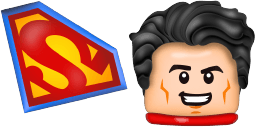
Vista previa del cursor: Lego man - 1 - cute-cursor.com

Pack de cursores

Lego man

LEGO CartoonsAdded 90 times

Lego man cursor pack for Chrome - gaming themed default pointer and player hand hover. Video game fan art.

Añadir a la extensión

Looking for a playful and colorful browser cursor? Look no further than the Lego man cursor from the Cartoons Cursor Collection! This fun cursor features a classic yellow Lego man, complete with moveable arms and legs. Whether you're working on a school project or just browsing the web for fun, this cursor is sure to put a smile on your face. Plus, it's easy to install and customize, so you can personalize your online experience with ease. Try the Lego man cursor today and add some fun to your browsing!

Archivos del cursor

Descarga el archivo o copia CSS y código de Roblox listos con el hotspot correcto.

Cursor - 1 - cute-cursor.com

Cursor

Descarga el archivo o copia el código para tu web, React, JavaScript o Roblox.

Descargar cursor para Roblox

Pega este CSS en tu hoja de estilos. Las coordenadas del hotspot ya están incluidas.

.custom-cursor {
  cursor: url('https://cute-cursor.com/cdn/packs/10082/arrow.png') 3 2, auto;
}

Pega este JavaScript para aplicar el cursor con el hotspot correcto.

const CURSOR_URL = 'https://cute-cursor.com/cdn/packs/10082/arrow.png';
const HOTSPOT_X = 3;
const HOTSPOT_Y = 2;
const CURSOR_FALLBACK = 'auto';

const cursorValue = `url('${CURSOR_URL}') ${HOTSPOT_X} ${HOTSPOT_Y}, ${CURSOR_FALLBACK}`;

// Apply to the whole page
document.body.style.cursor = cursorValue;

// Or apply to a specific element
// const target = document.querySelector('.my-element');
// if (target) target.style.cursor = cursorValue;

Copia este componente React y envuelve tu contenido con él.

import React from 'react';

const CURSOR_URL = 'https://cute-cursor.com/cdn/packs/10082/arrow.png';
const HOTSPOT_X = 3;
const HOTSPOT_Y = 2;
const CURSOR_FALLBACK = 'auto';

export default function CustomCursor({ children, className = '', as: Tag = 'div', style = {}, ...props }) {
  const cursorStyle = {
    cursor: `url('${CURSOR_URL}') ${HOTSPOT_X} ${HOTSPOT_Y}, ${CURSOR_FALLBACK}`,
    ...style,
  };

  return (
    <Tag className={className} style={cursorStyle} {...props}>
      {children}
    </Tag>
  );
}

// Usage:
// <CustomCursor>Your content</CustomCursor>

Sube la imagen a Roblox, reemplaza YOUR_ASSET_ID y pega este LocalScript.

-- Roblox custom cursor
-- Image URL: https://cute-cursor.com/cdn/packs/10082/arrow.png
-- Hotspot: 3, 2
-- Size: 128x128
-- 1. Upload the image to Roblox and copy rbxassetid
-- 2. Replace YOUR_ASSET_ID below
-- 3. Put this LocalScript in StarterPlayer > StarterPlayerScripts

local UserInputService = game:GetService("UserInputService")
local RunService = game:GetService("RunService")
local Players = game:GetService("Players")

local player = Players.LocalPlayer
local playerGui = player:WaitForChild("PlayerGui")

local HOTSPOT_X = 3
local HOTSPOT_Y = 2
local CURSOR_WIDTH = 128
local CURSOR_HEIGHT = 128

local screenGui = Instance.new("ScreenGui")
screenGui.Name = "CustomCursorGui"
screenGui.ResetOnSpawn = false
screenGui.IgnoreGuiInset = true
screenGui.DisplayOrder = 999999
screenGui.Parent = playerGui

local cursor = Instance.new("ImageLabel")
cursor.Name = "CustomCursor"
cursor.BackgroundTransparency = 1
cursor.Size = UDim2.fromOffset(CURSOR_WIDTH, CURSOR_HEIGHT)
cursor.Image = "rbxassetid://YOUR_ASSET_ID"
cursor.ZIndex = 999999
cursor.Parent = screenGui

UserInputService.MouseIconEnabled = false

RunService.RenderStepped:Connect(function()
    local mouseLocation = UserInputService:GetMouseLocation()
    cursor.Position = UDim2.fromOffset(mouseLocation.X - HOTSPOT_X, mouseLocation.Y - HOTSPOT_Y)
end)
Puntero - 2 - cute-cursor.com

Puntero

Descarga el archivo o copia el código para tu web, React, JavaScript o Roblox.

Descargar puntero para Roblox

Pega este CSS en tu hoja de estilos. Las coordenadas del hotspot ya están incluidas.

.custom-pointer {
  cursor: url('https://cute-cursor.com/cdn/packs/10082/hand.png') 32 1, pointer;
}

Pega este JavaScript para aplicar el cursor con el hotspot correcto.

const CURSOR_URL = 'https://cute-cursor.com/cdn/packs/10082/hand.png';
const HOTSPOT_X = 32;
const HOTSPOT_Y = 1;
const CURSOR_FALLBACK = 'pointer';

const cursorValue = `url('${CURSOR_URL}') ${HOTSPOT_X} ${HOTSPOT_Y}, ${CURSOR_FALLBACK}`;

// Apply to the whole page
document.body.style.cursor = cursorValue;

// Or apply to a specific element
// const target = document.querySelector('.my-element');
// if (target) target.style.cursor = cursorValue;

Copia este componente React y envuelve tu contenido con él.

import React from 'react';

const CURSOR_URL = 'https://cute-cursor.com/cdn/packs/10082/hand.png';
const HOTSPOT_X = 32;
const HOTSPOT_Y = 1;
const CURSOR_FALLBACK = 'pointer';

export default function CustomPointer({ children, className = '', as: Tag = 'div', style = {}, ...props }) {
  const cursorStyle = {
    cursor: `url('${CURSOR_URL}') ${HOTSPOT_X} ${HOTSPOT_Y}, ${CURSOR_FALLBACK}`,
    ...style,
  };

  return (
    <Tag className={className} style={cursorStyle} {...props}>
      {children}
    </Tag>
  );
}

// Usage:
// <CustomPointer>Your content</CustomPointer>

Sube la imagen a Roblox, reemplaza YOUR_ASSET_ID y pega este LocalScript.

-- Roblox custom cursor
-- Image URL: https://cute-cursor.com/cdn/packs/10082/hand.png
-- Hotspot: 32, 1
-- Size: 128x128
-- 1. Upload the image to Roblox and copy rbxassetid
-- 2. Replace YOUR_ASSET_ID below
-- 3. Put this LocalScript in StarterPlayer > StarterPlayerScripts

local UserInputService = game:GetService("UserInputService")
local RunService = game:GetService("RunService")
local Players = game:GetService("Players")

local player = Players.LocalPlayer
local playerGui = player:WaitForChild("PlayerGui")

local HOTSPOT_X = 32
local HOTSPOT_Y = 1
local CURSOR_WIDTH = 128
local CURSOR_HEIGHT = 128

local screenGui = Instance.new("ScreenGui")
screenGui.Name = "CustomCursorGui"
screenGui.ResetOnSpawn = false
screenGui.IgnoreGuiInset = true
screenGui.DisplayOrder = 999999
screenGui.Parent = playerGui

local cursor = Instance.new("ImageLabel")
cursor.Name = "CustomCursor"
cursor.BackgroundTransparency = 1
cursor.Size = UDim2.fromOffset(CURSOR_WIDTH, CURSOR_HEIGHT)
cursor.Image = "rbxassetid://YOUR_ASSET_ID"
cursor.ZIndex = 999999
cursor.Parent = screenGui

UserInputService.MouseIconEnabled = false

RunService.RenderStepped:Connect(function()
    local mouseLocation = UserInputService:GetMouseLocation()
    cursor.Position = UDim2.fromOffset(mouseLocation.X - HOTSPOT_X, mouseLocation.Y - HOTSPOT_Y)
end)
100 % gratis

Get the Cursor Changer extension

Gratis en Chrome. Instala la extensión y pulsa «Añadir» en cualquier cursor.

Instalar en Chrome