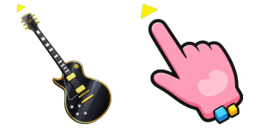
Podgląd kursora: Gold Outline Guitar - 1 - cute-cursor.com

Paczka kursorów

Gold Outline Guitar

AnimeDodano 1 razy

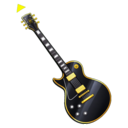
Gold Outline Guitar is a cute custom cursor: a black guitar with a gold rim and a pink pointing hand.

Dodaj do rozszerzenia

Gold Outline Guitar Custom Cursor Pack
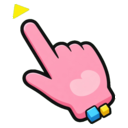
Gold Outline Guitar is a black electric guitar with a gold rim, gold hardware, and a small yellow triangle at the headstock. The hover state is a pink pointing hand with a blue cube, a yellow cube, and the same yellow triangle at the fingertip.

Use it as a custom cursor in Chrome and Edge on Windows 10 and Windows 11. Download the pack on this page and both the guitar and the hand are ready.

More sets are in the Anime collection, including Gold Outline Guitar.

This is an unofficial fan-made design and is not affiliated with or endorsed by any studio.

Pliki kursora

Pobierz plik lub skopiuj gotowy do użycia kod CSS, JavaScript, React i Roblox z poprawnym punktem aktywnym.

Kursor - 1 - cute-cursor.com

Kursor

Pobierz plik lub skopiuj kod osadzania dla swojej strony, React, JavaScript lub Roblox.

Wklej ten kod CSS do swojego arkusza stylów. Współrzędne punktu aktywnego są już uwzględnione.

.custom-cursor {
  cursor: url('https://cute-cursor.com/cdn/packs/146231/arrow.png') 18 5, auto;
}

Wklej ten kod JavaScript, aby zastosować kursor z poprawnym punktem aktywnym.

const CURSOR_URL = 'https://cute-cursor.com/cdn/packs/146231/arrow.png';
const HOTSPOT_X = 18;
const HOTSPOT_Y = 5;
const CURSOR_FALLBACK = 'auto';

const cursorValue = `url('${CURSOR_URL}') ${HOTSPOT_X} ${HOTSPOT_Y}, ${CURSOR_FALLBACK}`;

// Apply to the whole page
document.body.style.cursor = cursorValue;

// Or apply to a specific element
// const target = document.querySelector('.my-element');
// if (target) target.style.cursor = cursorValue;

Skopiuj ten komponent React i opakuj nim swoją zawartość.

import React from 'react';

const CURSOR_URL = 'https://cute-cursor.com/cdn/packs/146231/arrow.png';
const HOTSPOT_X = 18;
const HOTSPOT_Y = 5;
const CURSOR_FALLBACK = 'auto';

export default function CustomCursor({ children, className = '', as: Tag = 'div', style = {}, ...props }) {
  const cursorStyle = {
    cursor: `url('${CURSOR_URL}') ${HOTSPOT_X} ${HOTSPOT_Y}, ${CURSOR_FALLBACK}`,
    ...style,
  };

  return (
    <Tag className={className} style={cursorStyle} {...props}>
      {children}
    </Tag>
  );
}

// Usage:
// <CustomCursor>Your content</CustomCursor>

Prześlij obraz do Roblox, zastąp YOUR_ASSET_ID, a następnie wklej ten LocalScript.

-- Roblox custom cursor
-- Image URL: https://cute-cursor.com/cdn/packs/146231/arrow.png
-- Hotspot: 18, 5
-- Size: 128x128
-- 1. Upload the image to Roblox and copy rbxassetid
-- 2. Replace YOUR_ASSET_ID below
-- 3. Put this LocalScript in StarterPlayer > StarterPlayerScripts

local UserInputService = game:GetService("UserInputService")
local RunService = game:GetService("RunService")
local Players = game:GetService("Players")

local player = Players.LocalPlayer
local playerGui = player:WaitForChild("PlayerGui")

local HOTSPOT_X = 18
local HOTSPOT_Y = 5
local CURSOR_WIDTH = 128
local CURSOR_HEIGHT = 128

local screenGui = Instance.new("ScreenGui")
screenGui.Name = "CustomCursorGui"
screenGui.ResetOnSpawn = false
screenGui.IgnoreGuiInset = true
screenGui.DisplayOrder = 999999
screenGui.Parent = playerGui

local cursor = Instance.new("ImageLabel")
cursor.Name = "CustomCursor"
cursor.BackgroundTransparency = 1
cursor.Size = UDim2.fromOffset(CURSOR_WIDTH, CURSOR_HEIGHT)
cursor.Image = "rbxassetid://YOUR_ASSET_ID"
cursor.ZIndex = 999999
cursor.Parent = screenGui

UserInputService.MouseIconEnabled = false

RunService.RenderStepped:Connect(function()
    local mouseLocation = UserInputService:GetMouseLocation()
    cursor.Position = UDim2.fromOffset(mouseLocation.X - HOTSPOT_X, mouseLocation.Y - HOTSPOT_Y)
end)
Wskaźnik - 2 - cute-cursor.com

Wskaźnik

Pobierz plik lub skopiuj kod osadzania dla swojej strony, React, JavaScript lub Roblox.

Wklej ten kod CSS do swojego arkusza stylów. Współrzędne punktu aktywnego są już uwzględnione.

.custom-pointer {
  cursor: url('https://cute-cursor.com/cdn/packs/146231/hand.png') 15 5, pointer;
}

Wklej ten kod JavaScript, aby zastosować kursor z poprawnym punktem aktywnym.

const CURSOR_URL = 'https://cute-cursor.com/cdn/packs/146231/hand.png';
const HOTSPOT_X = 15;
const HOTSPOT_Y = 5;
const CURSOR_FALLBACK = 'pointer';

const cursorValue = `url('${CURSOR_URL}') ${HOTSPOT_X} ${HOTSPOT_Y}, ${CURSOR_FALLBACK}`;

// Apply to the whole page
document.body.style.cursor = cursorValue;

// Or apply to a specific element
// const target = document.querySelector('.my-element');
// if (target) target.style.cursor = cursorValue;

Skopiuj ten komponent React i opakuj nim swoją zawartość.

import React from 'react';

const CURSOR_URL = 'https://cute-cursor.com/cdn/packs/146231/hand.png';
const HOTSPOT_X = 15;
const HOTSPOT_Y = 5;
const CURSOR_FALLBACK = 'pointer';

export default function CustomPointer({ children, className = '', as: Tag = 'div', style = {}, ...props }) {
  const cursorStyle = {
    cursor: `url('${CURSOR_URL}') ${HOTSPOT_X} ${HOTSPOT_Y}, ${CURSOR_FALLBACK}`,
    ...style,
  };

  return (
    <Tag className={className} style={cursorStyle} {...props}>
      {children}
    </Tag>
  );
}

// Usage:
// <CustomPointer>Your content</CustomPointer>

Prześlij obraz do Roblox, zastąp YOUR_ASSET_ID, a następnie wklej ten LocalScript.

-- Roblox custom cursor
-- Image URL: https://cute-cursor.com/cdn/packs/146231/hand.png
-- Hotspot: 15, 5
-- Size: 128x128
-- 1. Upload the image to Roblox and copy rbxassetid
-- 2. Replace YOUR_ASSET_ID below
-- 3. Put this LocalScript in StarterPlayer > StarterPlayerScripts

local UserInputService = game:GetService("UserInputService")
local RunService = game:GetService("RunService")
local Players = game:GetService("Players")

local player = Players.LocalPlayer
local playerGui = player:WaitForChild("PlayerGui")

local HOTSPOT_X = 15
local HOTSPOT_Y = 5
local CURSOR_WIDTH = 128
local CURSOR_HEIGHT = 128

local screenGui = Instance.new("ScreenGui")
screenGui.Name = "CustomCursorGui"
screenGui.ResetOnSpawn = false
screenGui.IgnoreGuiInset = true
screenGui.DisplayOrder = 999999
screenGui.Parent = playerGui

local cursor = Instance.new("ImageLabel")
cursor.Name = "CustomCursor"
cursor.BackgroundTransparency = 1
cursor.Size = UDim2.fromOffset(CURSOR_WIDTH, CURSOR_HEIGHT)
cursor.Image = "rbxassetid://YOUR_ASSET_ID"
cursor.ZIndex = 999999
cursor.Parent = screenGui

UserInputService.MouseIconEnabled = false

RunService.RenderStepped:Connect(function()
    local mouseLocation = UserInputService:GetMouseLocation()
    cursor.Position = UDim2.fromOffset(mouseLocation.X - HOTSPOT_X, mouseLocation.Y - HOTSPOT_Y)
end)
100% za darmo

Pobierz rozszerzenie Cursor Changer

Darmowy dla Chrome. Zainstaluj raz, a następnie kliknij Dodaj przy dowolnym kursorze, który Ci się podoba.

Zainstaluj w Chrome