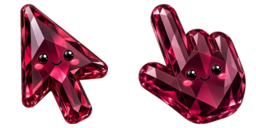
Vista previa del cursor: Rabbit - 1 - cute-cursor.com

Pack de cursores

Rabbit

Cute PetsAdded 343 times

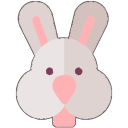
The Rabbit cursor from the Animals Cursor Collection is a cute and whimsical addition to any browser. Featuring an adorable cartoon rabbit, this cursor adds a touch of playfulness to your online exper...

Añadir a la extensión

The Rabbit cursor from the Animals Cursor Collection is a cute and whimsical addition to any browser. Featuring an adorable cartoon rabbit, this cursor adds a touch of playfulness to your online experience. Its smooth and fluid movement ensures that your mouse movements are precisely tracked, making it easy and enjoyable to navigate the web. Whether you are browsing the news, shopping online, or just scrolling through social media, the Rabbit cursor from the Animals Cursor Collection is sure to put a smile on your face.

Archivos del cursor

Descarga el archivo o copia CSS y código de Roblox listos con el hotspot correcto.

Cursor - 1 - cute-cursor.com

Cursor

Descarga el archivo o copia el código para tu web o Roblox.

Descargar cursor para Roblox

Pega este CSS en tu hoja de estilos. Las coordenadas del hotspot ya están incluidas.

.custom-cursor {
  cursor: url('https://cute-cursor.com/cdn/packs/10218/arrow.svg') 1 1, auto;
}

Sube la imagen a Roblox, reemplaza YOUR_ASSET_ID y pega este LocalScript.

-- Roblox custom cursor
-- Image URL: https://cute-cursor.com/cdn/packs/10218/arrow.svg
-- Hotspot: 1, 1
-- Size: 128x128
-- 1. Upload the image to Roblox and copy rbxassetid
-- 2. Replace YOUR_ASSET_ID below
-- 3. Put this LocalScript in StarterPlayer > StarterPlayerScripts

local UserInputService = game:GetService("UserInputService")
local RunService = game:GetService("RunService")
local Players = game:GetService("Players")

local player = Players.LocalPlayer
local playerGui = player:WaitForChild("PlayerGui")

local HOTSPOT_X = 1
local HOTSPOT_Y = 1
local CURSOR_WIDTH = 128
local CURSOR_HEIGHT = 128

local screenGui = Instance.new("ScreenGui")
screenGui.Name = "CustomCursorGui"
screenGui.ResetOnSpawn = false
screenGui.IgnoreGuiInset = true
screenGui.DisplayOrder = 999999
screenGui.Parent = playerGui

local cursor = Instance.new("ImageLabel")
cursor.Name = "CustomCursor"
cursor.BackgroundTransparency = 1
cursor.Size = UDim2.fromOffset(CURSOR_WIDTH, CURSOR_HEIGHT)
cursor.Image = "rbxassetid://YOUR_ASSET_ID"
cursor.ZIndex = 999999
cursor.Parent = screenGui

UserInputService.MouseIconEnabled = false

RunService.RenderStepped:Connect(function()
    local mouseLocation = UserInputService:GetMouseLocation()
    cursor.Position = UDim2.fromOffset(mouseLocation.X - HOTSPOT_X, mouseLocation.Y - HOTSPOT_Y)
end)
Puntero - 2 - cute-cursor.com

Puntero

Descarga el archivo o copia el código para tu web o Roblox.

Descargar puntero para Roblox

Pega este CSS en tu hoja de estilos. Las coordenadas del hotspot ya están incluidas.

.custom-pointer {
  cursor: url('https://cute-cursor.com/cdn/packs/10218/hand.svg') 31 1, pointer;
}

Sube la imagen a Roblox, reemplaza YOUR_ASSET_ID y pega este LocalScript.

-- Roblox custom cursor
-- Image URL: https://cute-cursor.com/cdn/packs/10218/hand.svg
-- Hotspot: 31, 1
-- Size: 128x128
-- 1. Upload the image to Roblox and copy rbxassetid
-- 2. Replace YOUR_ASSET_ID below
-- 3. Put this LocalScript in StarterPlayer > StarterPlayerScripts

local UserInputService = game:GetService("UserInputService")
local RunService = game:GetService("RunService")
local Players = game:GetService("Players")

local player = Players.LocalPlayer
local playerGui = player:WaitForChild("PlayerGui")

local HOTSPOT_X = 31
local HOTSPOT_Y = 1
local CURSOR_WIDTH = 128
local CURSOR_HEIGHT = 128

local screenGui = Instance.new("ScreenGui")
screenGui.Name = "CustomCursorGui"
screenGui.ResetOnSpawn = false
screenGui.IgnoreGuiInset = true
screenGui.DisplayOrder = 999999
screenGui.Parent = playerGui

local cursor = Instance.new("ImageLabel")
cursor.Name = "CustomCursor"
cursor.BackgroundTransparency = 1
cursor.Size = UDim2.fromOffset(CURSOR_WIDTH, CURSOR_HEIGHT)
cursor.Image = "rbxassetid://YOUR_ASSET_ID"
cursor.ZIndex = 999999
cursor.Parent = screenGui

UserInputService.MouseIconEnabled = false

RunService.RenderStepped:Connect(function()
    local mouseLocation = UserInputService:GetMouseLocation()
    cursor.Position = UDim2.fromOffset(mouseLocation.X - HOTSPOT_X, mouseLocation.Y - HOTSPOT_Y)
end)
100 % gratis

Get the Cursor Changer extension

Gratis en Chrome. Instala la extensión y pulsa «Añadir» en cualquier cursor.


Instalar en Chrome