Vista previa del cursor: Seashell and Starfish - 1 - cute-cursor.com

Pack de cursores

Seashell and Starfish

Cute NatureAdded 584 times

If you want to change your usual cursor to something cute, our sea cursor for mouse and pointer will be a good match for this job. Seashell as a cursor for mouse and cute starfish pointer will look pretty nice on your screen.

Añadir a la extensión

Archivos del cursor

Descarga el archivo o copia CSS y código de Roblox listos con el hotspot correcto.

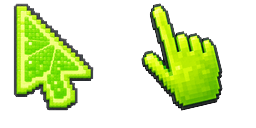
Cursor - 1 - cute-cursor.com

Cursor

Descarga el archivo o copia el código para tu web o Roblox.

Descargar cursor para Roblox

Pega este CSS en tu hoja de estilos. Las coordenadas del hotspot ya están incluidas.

.custom-cursor {
  cursor: url('https://cute-cursor.com/cdn/packs/303/arrow.svg') 0 3, auto;
}

Sube la imagen a Roblox, reemplaza YOUR_ASSET_ID y pega este LocalScript.

-- Roblox custom cursor
-- Image URL: https://cute-cursor.com/cdn/packs/303/arrow.svg
-- Hotspot: 0, 3
-- Size: 128x128
-- 1. Upload the image to Roblox and copy rbxassetid
-- 2. Replace YOUR_ASSET_ID below
-- 3. Put this LocalScript in StarterPlayer > StarterPlayerScripts

local UserInputService = game:GetService("UserInputService")
local RunService = game:GetService("RunService")
local Players = game:GetService("Players")

local player = Players.LocalPlayer
local playerGui = player:WaitForChild("PlayerGui")

local HOTSPOT_X = 0
local HOTSPOT_Y = 3
local CURSOR_WIDTH = 128
local CURSOR_HEIGHT = 128

local screenGui = Instance.new("ScreenGui")
screenGui.Name = "CustomCursorGui"
screenGui.ResetOnSpawn = false
screenGui.IgnoreGuiInset = true
screenGui.DisplayOrder = 999999
screenGui.Parent = playerGui

local cursor = Instance.new("ImageLabel")
cursor.Name = "CustomCursor"
cursor.BackgroundTransparency = 1
cursor.Size = UDim2.fromOffset(CURSOR_WIDTH, CURSOR_HEIGHT)
cursor.Image = "rbxassetid://YOUR_ASSET_ID"
cursor.ZIndex = 999999
cursor.Parent = screenGui

UserInputService.MouseIconEnabled = false

RunService.RenderStepped:Connect(function()
    local mouseLocation = UserInputService:GetMouseLocation()
    cursor.Position = UDim2.fromOffset(mouseLocation.X - HOTSPOT_X, mouseLocation.Y - HOTSPOT_Y)
end)
Puntero - 2 - cute-cursor.com

Puntero

Descarga el archivo o copia el código para tu web o Roblox.

Descargar puntero para Roblox

Pega este CSS en tu hoja de estilos. Las coordenadas del hotspot ya están incluidas.

.custom-pointer {
  cursor: url('https://cute-cursor.com/cdn/packs/303/hand.svg') 0 1, pointer;
}

Sube la imagen a Roblox, reemplaza YOUR_ASSET_ID y pega este LocalScript.

-- Roblox custom cursor
-- Image URL: https://cute-cursor.com/cdn/packs/303/hand.svg
-- Hotspot: 0, 1
-- Size: 128x128
-- 1. Upload the image to Roblox and copy rbxassetid
-- 2. Replace YOUR_ASSET_ID below
-- 3. Put this LocalScript in StarterPlayer > StarterPlayerScripts

local UserInputService = game:GetService("UserInputService")
local RunService = game:GetService("RunService")
local Players = game:GetService("Players")

local player = Players.LocalPlayer
local playerGui = player:WaitForChild("PlayerGui")

local HOTSPOT_X = 0
local HOTSPOT_Y = 1
local CURSOR_WIDTH = 128
local CURSOR_HEIGHT = 128

local screenGui = Instance.new("ScreenGui")
screenGui.Name = "CustomCursorGui"
screenGui.ResetOnSpawn = false
screenGui.IgnoreGuiInset = true
screenGui.DisplayOrder = 999999
screenGui.Parent = playerGui

local cursor = Instance.new("ImageLabel")
cursor.Name = "CustomCursor"
cursor.BackgroundTransparency = 1
cursor.Size = UDim2.fromOffset(CURSOR_WIDTH, CURSOR_HEIGHT)
cursor.Image = "rbxassetid://YOUR_ASSET_ID"
cursor.ZIndex = 999999
cursor.Parent = screenGui

UserInputService.MouseIconEnabled = false

RunService.RenderStepped:Connect(function()
    local mouseLocation = UserInputService:GetMouseLocation()
    cursor.Position = UDim2.fromOffset(mouseLocation.X - HOTSPOT_X, mouseLocation.Y - HOTSPOT_Y)
end)
100 % gratis

Get the Cursor Changer extension

Gratis en Chrome. Instala la extensión y pulsa «Añadir» en cualquier cursor.

Instalar en Chrome