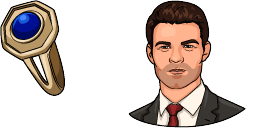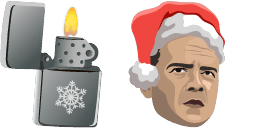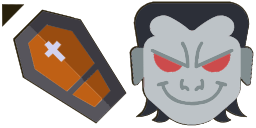
İmleç önizlemesi: Count Dracula - 1 - cute-cursor.com

İmleç paketi

Count Dracula

Movies89 kez eklendi

Browse with Count Dracula - a Chrome cursor featuring spooky themed pointer and haunted hover. Halloween fan art.

Uzantıya Ekle

The Count Dracula cursor from the Movies Cursor Collection is a frightening addition to any browser. Featuring the iconic vampire's piercing gaze and sharp fangs, this cursor is sure to send chills down your spine. The dark, eerie background and blood-red accents complete the overall sinister aesthetic. Whether you're a longtime fan of Bram Stoker's classic novel or just a lover of horror movies, this cursor is perfect for adding some spooky flair to your web browsing experience. Give it a try if you dare!

İmleç dosyaları

Dosyayı indirin veya doğru etkin noktayla hazır CSS, JavaScript, React ve Roblox kodunu kopyalayın.

İmleç - 1 - cute-cursor.com

İmleç

Dosyayı indirin veya web siteniz, React, JavaScript ya da Roblox için yerleştirme kodunu kopyalayın.

Bu CSS'i stil sayfanıza yapıştırın. Etkin nokta koordinatları zaten dahildir.

.custom-cursor {
  cursor: url('https://cute-cursor.com/cdn/packs/10161/arrow.png') 3 3, auto;
}

İmleci doğru etkin noktayla uygulamak için bu JavaScript'i yapıştırın.

const CURSOR_URL = 'https://cute-cursor.com/cdn/packs/10161/arrow.png';
const HOTSPOT_X = 3;
const HOTSPOT_Y = 3;
const CURSOR_FALLBACK = 'auto';

const cursorValue = `url('${CURSOR_URL}') ${HOTSPOT_X} ${HOTSPOT_Y}, ${CURSOR_FALLBACK}`;

// Apply to the whole page
document.body.style.cursor = cursorValue;

// Or apply to a specific element
// const target = document.querySelector('.my-element');
// if (target) target.style.cursor = cursorValue;

Bu React bileşenini kopyalayın ve içeriğinizi onunla sarmalayın.

import React from 'react';

const CURSOR_URL = 'https://cute-cursor.com/cdn/packs/10161/arrow.png';
const HOTSPOT_X = 3;
const HOTSPOT_Y = 3;
const CURSOR_FALLBACK = 'auto';

export default function CustomCursor({ children, className = '', as: Tag = 'div', style = {}, ...props }) {
  const cursorStyle = {
    cursor: `url('${CURSOR_URL}') ${HOTSPOT_X} ${HOTSPOT_Y}, ${CURSOR_FALLBACK}`,
    ...style,
  };

  return (
    <Tag className={className} style={cursorStyle} {...props}>
      {children}
    </Tag>
  );
}

// Usage:
// <CustomCursor>Your content</CustomCursor>

Görseli Roblox'a yükleyin, YOUR_ASSET_ID kısmını değiştirin, ardından bu LocalScript'i yapıştırın.

-- Roblox custom cursor
-- Image URL: https://cute-cursor.com/cdn/packs/10161/arrow.png
-- Hotspot: 3, 3
-- Size: 128x128
-- 1. Upload the image to Roblox and copy rbxassetid
-- 2. Replace YOUR_ASSET_ID below
-- 3. Put this LocalScript in StarterPlayer > StarterPlayerScripts

local UserInputService = game:GetService("UserInputService")
local RunService = game:GetService("RunService")
local Players = game:GetService("Players")

local player = Players.LocalPlayer
local playerGui = player:WaitForChild("PlayerGui")

local HOTSPOT_X = 3
local HOTSPOT_Y = 3
local CURSOR_WIDTH = 128
local CURSOR_HEIGHT = 128

local screenGui = Instance.new("ScreenGui")
screenGui.Name = "CustomCursorGui"
screenGui.ResetOnSpawn = false
screenGui.IgnoreGuiInset = true
screenGui.DisplayOrder = 999999
screenGui.Parent = playerGui

local cursor = Instance.new("ImageLabel")
cursor.Name = "CustomCursor"
cursor.BackgroundTransparency = 1
cursor.Size = UDim2.fromOffset(CURSOR_WIDTH, CURSOR_HEIGHT)
cursor.Image = "rbxassetid://YOUR_ASSET_ID"
cursor.ZIndex = 999999
cursor.Parent = screenGui

UserInputService.MouseIconEnabled = false

RunService.RenderStepped:Connect(function()
    local mouseLocation = UserInputService:GetMouseLocation()
    cursor.Position = UDim2.fromOffset(mouseLocation.X - HOTSPOT_X, mouseLocation.Y - HOTSPOT_Y)
end)
İşaretçi - 2 - cute-cursor.com

İşaretçi

Dosyayı indirin veya web siteniz, React, JavaScript ya da Roblox için yerleştirme kodunu kopyalayın.

Bu CSS'i stil sayfanıza yapıştırın. Etkin nokta koordinatları zaten dahildir.

.custom-pointer {
  cursor: url('https://cute-cursor.com/cdn/packs/10161/hand.png') 31 2, pointer;
}

İmleci doğru etkin noktayla uygulamak için bu JavaScript'i yapıştırın.

const CURSOR_URL = 'https://cute-cursor.com/cdn/packs/10161/hand.png';
const HOTSPOT_X = 31;
const HOTSPOT_Y = 2;
const CURSOR_FALLBACK = 'pointer';

const cursorValue = `url('${CURSOR_URL}') ${HOTSPOT_X} ${HOTSPOT_Y}, ${CURSOR_FALLBACK}`;

// Apply to the whole page
document.body.style.cursor = cursorValue;

// Or apply to a specific element
// const target = document.querySelector('.my-element');
// if (target) target.style.cursor = cursorValue;

Bu React bileşenini kopyalayın ve içeriğinizi onunla sarmalayın.

import React from 'react';

const CURSOR_URL = 'https://cute-cursor.com/cdn/packs/10161/hand.png';
const HOTSPOT_X = 31;
const HOTSPOT_Y = 2;
const CURSOR_FALLBACK = 'pointer';

export default function CustomPointer({ children, className = '', as: Tag = 'div', style = {}, ...props }) {
  const cursorStyle = {
    cursor: `url('${CURSOR_URL}') ${HOTSPOT_X} ${HOTSPOT_Y}, ${CURSOR_FALLBACK}`,
    ...style,
  };

  return (
    <Tag className={className} style={cursorStyle} {...props}>
      {children}
    </Tag>
  );
}

// Usage:
// <CustomPointer>Your content</CustomPointer>

Görseli Roblox'a yükleyin, YOUR_ASSET_ID kısmını değiştirin, ardından bu LocalScript'i yapıştırın.

-- Roblox custom cursor
-- Image URL: https://cute-cursor.com/cdn/packs/10161/hand.png
-- Hotspot: 31, 2
-- Size: 128x128
-- 1. Upload the image to Roblox and copy rbxassetid
-- 2. Replace YOUR_ASSET_ID below
-- 3. Put this LocalScript in StarterPlayer > StarterPlayerScripts

local UserInputService = game:GetService("UserInputService")
local RunService = game:GetService("RunService")
local Players = game:GetService("Players")

local player = Players.LocalPlayer
local playerGui = player:WaitForChild("PlayerGui")

local HOTSPOT_X = 31
local HOTSPOT_Y = 2
local CURSOR_WIDTH = 128
local CURSOR_HEIGHT = 128

local screenGui = Instance.new("ScreenGui")
screenGui.Name = "CustomCursorGui"
screenGui.ResetOnSpawn = false
screenGui.IgnoreGuiInset = true
screenGui.DisplayOrder = 999999
screenGui.Parent = playerGui

local cursor = Instance.new("ImageLabel")
cursor.Name = "CustomCursor"
cursor.BackgroundTransparency = 1
cursor.Size = UDim2.fromOffset(CURSOR_WIDTH, CURSOR_HEIGHT)
cursor.Image = "rbxassetid://YOUR_ASSET_ID"
cursor.ZIndex = 999999
cursor.Parent = screenGui

UserInputService.MouseIconEnabled = false

RunService.RenderStepped:Connect(function()
    local mouseLocation = UserInputService:GetMouseLocation()
    cursor.Position = UDim2.fromOffset(mouseLocation.X - HOTSPOT_X, mouseLocation.Y - HOTSPOT_Y)
end)
%100 Ücretsiz

İmleç Değiştirici uzantısını edinin

Chrome için ücretsiz. Bir kez yükleyin, ardından beğendiğiniz herhangi bir imlece Ekle'ye tıklayın.

Chrome'a Yükle