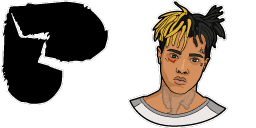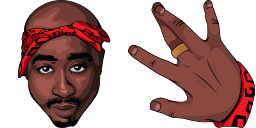
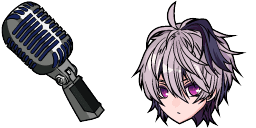
Pratinjau kursor: 2Pac - 1 - cute-cursor.com

Paket kursor

2Pac

Hip-Hop LegendsDitambahkan 84 kali

2Pac cursor for Chrome - legendary rapper pointer with bandana hover hand. Hip-hop music artist fan art.

Tambahkan ke Ekstensi

Tupac Amaru Shakur, better known by his stage name 2Pac, was an American rapper and actor. You'll see 2Pac pointer on the default cursor and bandana hover hand when you move over links. Works in Chrome through the Cute Cursor extension. Considered one of the most influential rappers of all time, best-selling music artists, having sold more than 75 million records worldwide.

File kursor

Unduh file atau salin kode CSS, JavaScript, React, dan Roblox siap pakai dengan hotspot yang tepat.

Kursor - 1 - cute-cursor.com

Kursor

Unduh file atau salin kode sematan untuk situs web, React, JavaScript, atau Roblox Anda.

Tempel CSS ini ke dalam stylesheet Anda. Koordinat hotspot sudah termasuk.

.custom-cursor {
  cursor: url('https://cute-cursor.com/cdn/packs/744/arrow.png') 52 0, auto;
}

Tempel JavaScript ini untuk menerapkan kursor dengan hotspot yang tepat.

const CURSOR_URL = 'https://cute-cursor.com/cdn/packs/744/arrow.png';
const HOTSPOT_X = 52;
const HOTSPOT_Y = 0;
const CURSOR_FALLBACK = 'auto';

const cursorValue = `url('${CURSOR_URL}') ${HOTSPOT_X} ${HOTSPOT_Y}, ${CURSOR_FALLBACK}`;

// Apply to the whole page
document.body.style.cursor = cursorValue;

// Or apply to a specific element
// const target = document.querySelector('.my-element');
// if (target) target.style.cursor = cursorValue;

Salin komponen React ini dan bungkus konten Anda dengannya.

import React from 'react';

const CURSOR_URL = 'https://cute-cursor.com/cdn/packs/744/arrow.png';
const HOTSPOT_X = 52;
const HOTSPOT_Y = 0;
const CURSOR_FALLBACK = 'auto';

export default function CustomCursor({ children, className = '', as: Tag = 'div', style = {}, ...props }) {
  const cursorStyle = {
    cursor: `url('${CURSOR_URL}') ${HOTSPOT_X} ${HOTSPOT_Y}, ${CURSOR_FALLBACK}`,
    ...style,
  };

  return (
    <Tag className={className} style={cursorStyle} {...props}>
      {children}
    </Tag>
  );
}

// Usage:
// <CustomCursor>Your content</CustomCursor>

Unggah gambar ke Roblox, ganti YOUR_ASSET_ID, lalu tempel LocalScript ini.

-- Roblox custom cursor
-- Image URL: https://cute-cursor.com/cdn/packs/744/arrow.png
-- Hotspot: 52, 0
-- Size: 128x128
-- 1. Upload the image to Roblox and copy rbxassetid
-- 2. Replace YOUR_ASSET_ID below
-- 3. Put this LocalScript in StarterPlayer > StarterPlayerScripts

local UserInputService = game:GetService("UserInputService")
local RunService = game:GetService("RunService")
local Players = game:GetService("Players")

local player = Players.LocalPlayer
local playerGui = player:WaitForChild("PlayerGui")

local HOTSPOT_X = 52
local HOTSPOT_Y = 0
local CURSOR_WIDTH = 128
local CURSOR_HEIGHT = 128

local screenGui = Instance.new("ScreenGui")
screenGui.Name = "CustomCursorGui"
screenGui.ResetOnSpawn = false
screenGui.IgnoreGuiInset = true
screenGui.DisplayOrder = 999999
screenGui.Parent = playerGui

local cursor = Instance.new("ImageLabel")
cursor.Name = "CustomCursor"
cursor.BackgroundTransparency = 1
cursor.Size = UDim2.fromOffset(CURSOR_WIDTH, CURSOR_HEIGHT)
cursor.Image = "rbxassetid://YOUR_ASSET_ID"
cursor.ZIndex = 999999
cursor.Parent = screenGui

UserInputService.MouseIconEnabled = false

RunService.RenderStepped:Connect(function()
    local mouseLocation = UserInputService:GetMouseLocation()
    cursor.Position = UDim2.fromOffset(mouseLocation.X - HOTSPOT_X, mouseLocation.Y - HOTSPOT_Y)
end)
Pointer - 2 - cute-cursor.com

Pointer

Unduh file atau salin kode sematan untuk situs web, React, JavaScript, atau Roblox Anda.

Tempel CSS ini ke dalam stylesheet Anda. Koordinat hotspot sudah termasuk.

.custom-pointer {
  cursor: url('https://cute-cursor.com/cdn/packs/744/hand.png') 78 0, pointer;
}

Tempel JavaScript ini untuk menerapkan kursor dengan hotspot yang tepat.

const CURSOR_URL = 'https://cute-cursor.com/cdn/packs/744/hand.png';
const HOTSPOT_X = 78;
const HOTSPOT_Y = 0;
const CURSOR_FALLBACK = 'pointer';

const cursorValue = `url('${CURSOR_URL}') ${HOTSPOT_X} ${HOTSPOT_Y}, ${CURSOR_FALLBACK}`;

// Apply to the whole page
document.body.style.cursor = cursorValue;

// Or apply to a specific element
// const target = document.querySelector('.my-element');
// if (target) target.style.cursor = cursorValue;

Salin komponen React ini dan bungkus konten Anda dengannya.

import React from 'react';

const CURSOR_URL = 'https://cute-cursor.com/cdn/packs/744/hand.png';
const HOTSPOT_X = 78;
const HOTSPOT_Y = 0;
const CURSOR_FALLBACK = 'pointer';

export default function CustomPointer({ children, className = '', as: Tag = 'div', style = {}, ...props }) {
  const cursorStyle = {
    cursor: `url('${CURSOR_URL}') ${HOTSPOT_X} ${HOTSPOT_Y}, ${CURSOR_FALLBACK}`,
    ...style,
  };

  return (
    <Tag className={className} style={cursorStyle} {...props}>
      {children}
    </Tag>
  );
}

// Usage:
// <CustomPointer>Your content</CustomPointer>

Unggah gambar ke Roblox, ganti YOUR_ASSET_ID, lalu tempel LocalScript ini.

-- Roblox custom cursor
-- Image URL: https://cute-cursor.com/cdn/packs/744/hand.png
-- Hotspot: 78, 0
-- Size: 128x128
-- 1. Upload the image to Roblox and copy rbxassetid
-- 2. Replace YOUR_ASSET_ID below
-- 3. Put this LocalScript in StarterPlayer > StarterPlayerScripts

local UserInputService = game:GetService("UserInputService")
local RunService = game:GetService("RunService")
local Players = game:GetService("Players")

local player = Players.LocalPlayer
local playerGui = player:WaitForChild("PlayerGui")

local HOTSPOT_X = 78
local HOTSPOT_Y = 0
local CURSOR_WIDTH = 128
local CURSOR_HEIGHT = 128

local screenGui = Instance.new("ScreenGui")
screenGui.Name = "CustomCursorGui"
screenGui.ResetOnSpawn = false
screenGui.IgnoreGuiInset = true
screenGui.DisplayOrder = 999999
screenGui.Parent = playerGui

local cursor = Instance.new("ImageLabel")
cursor.Name = "CustomCursor"
cursor.BackgroundTransparency = 1
cursor.Size = UDim2.fromOffset(CURSOR_WIDTH, CURSOR_HEIGHT)
cursor.Image = "rbxassetid://YOUR_ASSET_ID"
cursor.ZIndex = 999999
cursor.Parent = screenGui

UserInputService.MouseIconEnabled = false

RunService.RenderStepped:Connect(function()
    local mouseLocation = UserInputService:GetMouseLocation()
    cursor.Position = UDim2.fromOffset(mouseLocation.X - HOTSPOT_X, mouseLocation.Y - HOTSPOT_Y)
end)
100% Gratis

Dapatkan ekstensi Cursor Changer

Gratis untuk Chrome. Pasang sekali, lalu klik Tambah pada kursor mana pun yang Anda sukai.

Pasang ke Chrome