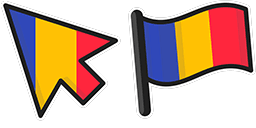
Pré-visualização do cursor: Bulgaria - 1 - cute-cursor.com

Pacote de cursor

Bulgaria

FlagsAdicionado 118 vezes

Bulgaria cursor pack for Chrome - Bulgaria flag default pointer and patriotic hand hover. Country fan art pack.

Adicionar à Extensão

Introducing the Bulgaria cursor for browsers from the Flags Cursor Collection! This cursor features an elegant design with the Bulgarian national flag in the background. It is perfect for anyone who wants to show their Bulgarian pride or simply add a unique touch to their browsing experience. Installation is easy – simply download and apply the cursor to your browser. With the Bulgaria cursor from the Flags Cursor Collection, you can represent this beautiful country in style. Get yours today!

Arquivos do cursor

Baixe o arquivo ou copie o código CSS, JavaScript, React e Roblox pronto para usar, com o hotspot correto.

Cursor - 1 - cute-cursor.com

Cursor

Baixe o arquivo ou copie o código de incorporação para o seu site, React, JavaScript ou Roblox.

Cole este CSS na sua folha de estilos. As coordenadas do hotspot já estão incluídas.

.custom-cursor {
  cursor: url('https://cute-cursor.com/cdn/packs/10294/arrow.png') 3 1, auto;
}

Cole este JavaScript para aplicar o cursor com o hotspot correto.

const CURSOR_URL = 'https://cute-cursor.com/cdn/packs/10294/arrow.png';
const HOTSPOT_X = 3;
const HOTSPOT_Y = 1;
const CURSOR_FALLBACK = 'auto';

const cursorValue = `url('${CURSOR_URL}') ${HOTSPOT_X} ${HOTSPOT_Y}, ${CURSOR_FALLBACK}`;

// Apply to the whole page
document.body.style.cursor = cursorValue;

// Or apply to a specific element
// const target = document.querySelector('.my-element');
// if (target) target.style.cursor = cursorValue;

Copie este componente React e envolva seu conteúdo com ele.

import React from 'react';

const CURSOR_URL = 'https://cute-cursor.com/cdn/packs/10294/arrow.png';
const HOTSPOT_X = 3;
const HOTSPOT_Y = 1;
const CURSOR_FALLBACK = 'auto';

export default function CustomCursor({ children, className = '', as: Tag = 'div', style = {}, ...props }) {
  const cursorStyle = {
    cursor: `url('${CURSOR_URL}') ${HOTSPOT_X} ${HOTSPOT_Y}, ${CURSOR_FALLBACK}`,
    ...style,
  };

  return (
    <Tag className={className} style={cursorStyle} {...props}>
      {children}
    </Tag>
  );
}

// Usage:
// <CustomCursor>Your content</CustomCursor>

Envie a imagem para o Roblox, substitua YOUR_ASSET_ID e cole este LocalScript.

-- Roblox custom cursor
-- Image URL: https://cute-cursor.com/cdn/packs/10294/arrow.png
-- Hotspot: 3, 1
-- Size: 128x128
-- 1. Upload the image to Roblox and copy rbxassetid
-- 2. Replace YOUR_ASSET_ID below
-- 3. Put this LocalScript in StarterPlayer > StarterPlayerScripts

local UserInputService = game:GetService("UserInputService")
local RunService = game:GetService("RunService")
local Players = game:GetService("Players")

local player = Players.LocalPlayer
local playerGui = player:WaitForChild("PlayerGui")

local HOTSPOT_X = 3
local HOTSPOT_Y = 1
local CURSOR_WIDTH = 128
local CURSOR_HEIGHT = 128

local screenGui = Instance.new("ScreenGui")
screenGui.Name = "CustomCursorGui"
screenGui.ResetOnSpawn = false
screenGui.IgnoreGuiInset = true
screenGui.DisplayOrder = 999999
screenGui.Parent = playerGui

local cursor = Instance.new("ImageLabel")
cursor.Name = "CustomCursor"
cursor.BackgroundTransparency = 1
cursor.Size = UDim2.fromOffset(CURSOR_WIDTH, CURSOR_HEIGHT)
cursor.Image = "rbxassetid://YOUR_ASSET_ID"
cursor.ZIndex = 999999
cursor.Parent = screenGui

UserInputService.MouseIconEnabled = false

RunService.RenderStepped:Connect(function()
    local mouseLocation = UserInputService:GetMouseLocation()
    cursor.Position = UDim2.fromOffset(mouseLocation.X - HOTSPOT_X, mouseLocation.Y - HOTSPOT_Y)
end)
Ponteiro - 2 - cute-cursor.com

Ponteiro

Baixe o arquivo ou copie o código de incorporação para o seu site, React, JavaScript ou Roblox.

Cole este CSS na sua folha de estilos. As coordenadas do hotspot já estão incluídas.

.custom-pointer {
  cursor: url('https://cute-cursor.com/cdn/packs/10294/hand.png') 31 3, pointer;
}

Cole este JavaScript para aplicar o cursor com o hotspot correto.

const CURSOR_URL = 'https://cute-cursor.com/cdn/packs/10294/hand.png';
const HOTSPOT_X = 31;
const HOTSPOT_Y = 3;
const CURSOR_FALLBACK = 'pointer';

const cursorValue = `url('${CURSOR_URL}') ${HOTSPOT_X} ${HOTSPOT_Y}, ${CURSOR_FALLBACK}`;

// Apply to the whole page
document.body.style.cursor = cursorValue;

// Or apply to a specific element
// const target = document.querySelector('.my-element');
// if (target) target.style.cursor = cursorValue;

Copie este componente React e envolva seu conteúdo com ele.

import React from 'react';

const CURSOR_URL = 'https://cute-cursor.com/cdn/packs/10294/hand.png';
const HOTSPOT_X = 31;
const HOTSPOT_Y = 3;
const CURSOR_FALLBACK = 'pointer';

export default function CustomPointer({ children, className = '', as: Tag = 'div', style = {}, ...props }) {
  const cursorStyle = {
    cursor: `url('${CURSOR_URL}') ${HOTSPOT_X} ${HOTSPOT_Y}, ${CURSOR_FALLBACK}`,
    ...style,
  };

  return (
    <Tag className={className} style={cursorStyle} {...props}>
      {children}
    </Tag>
  );
}

// Usage:
// <CustomPointer>Your content</CustomPointer>

Envie a imagem para o Roblox, substitua YOUR_ASSET_ID e cole este LocalScript.

-- Roblox custom cursor
-- Image URL: https://cute-cursor.com/cdn/packs/10294/hand.png
-- Hotspot: 31, 3
-- Size: 128x128
-- 1. Upload the image to Roblox and copy rbxassetid
-- 2. Replace YOUR_ASSET_ID below
-- 3. Put this LocalScript in StarterPlayer > StarterPlayerScripts

local UserInputService = game:GetService("UserInputService")
local RunService = game:GetService("RunService")
local Players = game:GetService("Players")

local player = Players.LocalPlayer
local playerGui = player:WaitForChild("PlayerGui")

local HOTSPOT_X = 31
local HOTSPOT_Y = 3
local CURSOR_WIDTH = 128
local CURSOR_HEIGHT = 128

local screenGui = Instance.new("ScreenGui")
screenGui.Name = "CustomCursorGui"
screenGui.ResetOnSpawn = false
screenGui.IgnoreGuiInset = true
screenGui.DisplayOrder = 999999
screenGui.Parent = playerGui

local cursor = Instance.new("ImageLabel")
cursor.Name = "CustomCursor"
cursor.BackgroundTransparency = 1
cursor.Size = UDim2.fromOffset(CURSOR_WIDTH, CURSOR_HEIGHT)
cursor.Image = "rbxassetid://YOUR_ASSET_ID"
cursor.ZIndex = 999999
cursor.Parent = screenGui

UserInputService.MouseIconEnabled = false

RunService.RenderStepped:Connect(function()
    local mouseLocation = UserInputService:GetMouseLocation()
    cursor.Position = UDim2.fromOffset(mouseLocation.X - HOTSPOT_X, mouseLocation.Y - HOTSPOT_Y)
end)
100% Grátis

Obtenha a extensão Cursor Changer

Gratuito para o Chrome. Instale uma vez e depois clique em Adicionar em qualquer cursor que você gostar.

Instalar no Chrome